Some Outstanding Android Apps
A list of great but underappreciated apps for Android I'd like to share and give thanks to.
Feb 27, 2023 •
7 min •
1398 words
Table of Contents
Tags
The Play Store Problem #
The Google Play Store dominates the Android experience for the vast majority of users, to the extent that most aren’t aware that other app stores even exist. This is a significant problem because Google does not promote apps based on whether they are good for the user but instead on whether they are good for their bottom line.
Sadly, this means AD-ridden and privacy-invasive apps shoot to the top rankings, leaving apps made by ordinary, honest people in their dust.
Those who aren’t technically inclined, and even most people who consider themselves “tech-smart”, act the same way. They will trust any app thrown at them by Google, whether developed by an average, honest person or the evilest, most data-hungry corporation on the planet. The same is true for iOS, but with Android, there is a path to escape this controlled realm of mainstream app stores and corporate surveillance.
It’s not all doom and gloom, however. You’re about to discover some of the most outstanding but underappreciated apps available. These apps are designed with simplicity and user-friendliness in mind, making them a breeze to use. Let this mark the start of a clear-out of your phone. Drop at least some of the junkware and swap it out for an app on this list.
About This List #
These Apps Are #
- Free to use
- Open-source
- Freedom respecting
- Privacy respecting
And used by myself regularly.
How to Get These Apps #
All these recommendations are available through the F-Droid app store, with some requiring the IzzyOnDroid app repository to be added. If F-Droid isn’t your cup of tea, the apps can be added to Obtanium or downloaded directly as APKs from their respective source code repositories.
Support the Developers #
The developers of these apps have put a lot of time and effort into developing them. If you use an app regularly, you should share your thanks and donate to the developer. I have made one financial contribution to one of the apps on this list in the past, and I plan to create and distribute a fund based on how often I use or find an app helpful. (I will write an article about this if I follow through with it)
The Apps #
Simple Mobile Tools #
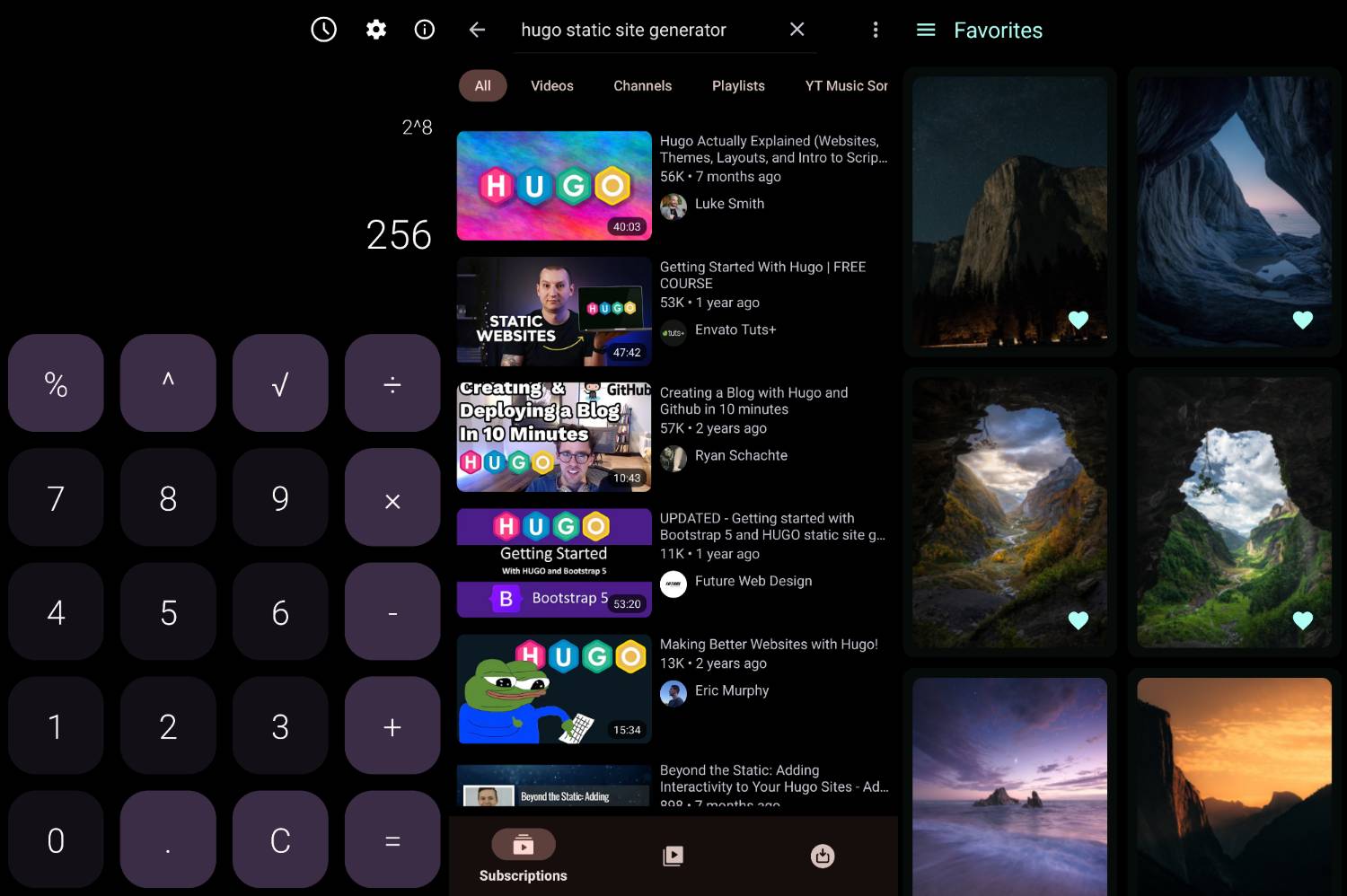
Simple Mobile Tools by Tibor Kaputa offers a wide range of apps to replace and better their stock counterparts. As the name suggests, all Simple Mobile Tools apps are simple but very useful and powerful when used correctly. Their apps are miles ahead of their pre-installed counterparts. Many are drop-in replacements for stock apps, making them an excellent upgrade for any Android device.
I would also use their clock and dialler apps, but unfortunately, I ran into some phone-specific issues. My phone doesn’t play well with third-party alarm and dialer apps, and the lack of call recording is a deal breaker for me, anyway.
Overall, their apps are simple and well-thought-out, pleasing to look at with their extensive theming options, including Material You. They work entirely offline while supporting web-based syncing (via DAVx⁵) where needed.
LibreTube #
LibreTube is a YouTube client with additional functionality that the YouTube app either does not offer or charges a subscription for. It eliminates ADs completely and even includes SponsorBlock built-in. It is a relatively new app that competes with another YouTube player called NewPipe.
LibreTube is visually appealing and highly functional, with many beneficial features and enhancements over the YouTube app. In my opinion, these and the blocking of AD/sponsors make LibreTube the best YouTube player on mobile. Whether you’re in it for music or video, background playback or AD-free watching, the experience is responsive and vivid.
However, the app is still a work in progress, with LibreTube’s Material Design 3 UI suffering problems related to colours and theming. I’ve noticed that bugs elsewhere appear and disappear from update to update. Despite these issues, I decided to switch to LibreTube soon after hearing about it and haven’t looked back.
Wall You #
Wall You is a simple wallpaper gallery client. It connects to various wallpaper repositories and lets you download, favourite, and set any available wallpaper as your home screen background.
Compared to similar apps on the Google Play Store, Wall You sets itself apart by being simple, honest, and exceedingly well-built with a seamless implementation of Material Design 3 and Material You. It is an excellent app, and it is a great utility. I found some of my all-time favourite wallpapers in the Wallhaven gallery through this app.
Barcode Scanner #
Similar to the app Wall You mentioned before, Barcode Scanner by Atharok has one purpose and exceeds its expectations without being bloated or suffering from feature creep.
Carrying on the trend of functional and responsive apps using Material Design 3, this app also takes advantage of the standard. It uses it tremendously well along with Material You and may be the nicest-looking app on my phone.
Besides allowing the user to scan and create a range of QR codes and barcodes, the app features a food information database. Scan the barcode of a food item, and if the item is in the Open Food Facts database, you’ll see helpful information about the item and its ingredients. If you haven’t seen this in action before, I recommend you give it a shot, as it’s both mesmerizing and succinct at the same time. This feature of the app requires an internet connection to access the online database, but other than this specific feature, the app retains full functionality while offline.
Catima #
Catima is a simple wallet app for keeping track of membership cards. Handy for keeping your gym membership or rewards cards accessible, it also integrates with Android’s Device Controls menu. This makes accessing your cards speedy: hold the power button and use the Device Controls menu to display your cards even on the lock screen.
Although this app covers some bases of Material Design 3, certain areas don’t look quite right and deviate from the standard compared to other apps I’ve mentioned. The app does not feature Material You support, or at least not on my phone. The multiple themes in the app should fill this gap. Still, the closest colour option might not match the rest of your system perfectly.
OpenTracks #
OpenTracks may be the most feature-rich fitness and sports tracker in its class. It can track various data points based on your GPS location, requiring no additional hardware for basic functionality. It works offline, saving recorded data locally and allowing for easy importing and exporting of recorded tracks.
It has broad support for Bluetooth sensors and accessories, of which I use a speed and cadence sensor when riding my bike. My OpenTracks app is set to display real-time info such as speed, cadence, distance travelled, current time, etc., during each ride.
The app was recently redesigned for Material Design 3 and now looks better than ever before. Although the app only has two themes, both are functional and easy to read outside, whereas a more colourful scheme would likely fall short. The dark theme is more suited for lower power usage, higher clarity, etc., and is thankfully OLED/AMOLED compatible. The latter is a must for this kind of app, as I use the device to monitor my speed and other readouts for hours.
Tremotesf #
Tremotesf is a remote control app for Transmission, a BitTorrent client. It is designed to connect to your Transmission client and lets you command it by managing downloads and settings. I use this app to control and monitor my Transmission client when I’m away from home, and because it’s so convenient and high quality, I even use it at home too.
I’ve only started using this app recently, but in the time I’ve used it, I’ve only noticed a few rough edges. The app uses Material Design 3 quite well but does not support Material You, with just two pre-defined theme colour options. It does not have the option to take advantage of OLED/AMOLED dark themes on modern phone screens either.
Conclusion #
I hope this short list has inspired you to seek out privacy and freedom-respecting alternatives to the stock or Play Store apps you have on your phone.
Let me know about other apps that meet the criteria at the beginning of the article.